How Russian Hackers Hijacked Routers to Steal Microsoft Office Authentication Tokens: A Step-by-Step Analysis
Introduction
In December 2025, security researchers at Black Lotus Labs uncovered a sophisticated but elegantly simple spying campaign conducted by the Russian state-sponsored threat actor known as Forest Blizzard (also referred to as APT28 or Fancy Bear). The group—linked to Russia’s Main Intelligence Directorate (GRU)—used known vulnerabilities in older internet routers to silently intercept authentication tokens from Microsoft Office users. Remarkably, the operation required no malware installation on the targeted routers. Instead, it leveraged DNS hijacking to redirect traffic and siphon OAuth tokens from over 18,000 networks. This guide walks through the step-by-step methodology the hackers employed, based on findings from Lumen's Black Lotus Labs, Microsoft, and the UK’s National Cyber Security Centre (NCSC). Understanding these steps can help network administrators and security teams identify and prevent similar attacks.

What You Need (Prerequisites for Understanding the Attack)
To follow this guide, you should be familiar with:
- DNS (Domain Name System) – the system that translates human-readable domain names into IP addresses.
- OAuth tokens – authentication tokens used by Microsoft Office and other services to grant access after a user logs in.
- Router vulnerabilities – known security flaws in outdated firmware, particularly on small office/home office (SOHO) devices like MikroTik and TP-Link.
- DNS servers controlled by attackers – virtual private servers (VPS) that the hackers used to reroute DNS queries.
- End-of-life routers – devices no longer supported by manufacturers and thus missing security patches.
Step-by-Step Attack Methodology
-
Step 1: Identify and Target Vulnerable Routers
Forest Blizzard scanned the internet for routers running outdated firmware—primarily older MikroTik and TP-Link devices marketed to small offices and home users. These routers were often end-of-life or far behind on security updates, making them easy targets. The hackers focused on networks used by government agencies, including ministries of foreign affairs, law enforcement, and third-party email providers, but also affected over 200 organizations and 5,000 consumer devices.
-
Step 2: Exploit Known Vulnerabilities Without Malware
Rather than installing malicious code on the routers, the attackers used known vulnerabilities (publicly documented flaws) to gain unauthorized access. Because the devices were outdated, the vulnerabilities had never been patched. This approach allowed the hackers to modify router configuration without leaving malware, making detection much harder.
-
Step 3: Modify the Router’s DNS Settings
Once inside the router’s administrative interface, the hackers changed the Domain Name System (DNS) server settings. Instead of using legitimate DNS servers (like those provided by ISPs or public resolvers), they pointed the router to a handful of virtual private servers (VPS) under their control. This is a classic DNS hijacking technique.
-
Step 4: Propagate Malicious DNS Settings to All Network Users
The compromised router automatically distributed the attacker’s DNS server addresses to every device on the local network via DHCP. As a result, all users—whether on desktops, laptops, or mobile devices—began sending their DNS queries to servers operated by Forest Blizzard. The users experienced no visible change in internet performance, so the hijacking remained hidden.
-
Step 5: Intercept OAuth Authentication Tokens
The attackers’ DNS servers handled queries for Microsoft Office services (like login.live.com). When a user attempted to authenticate with Microsoft Office (e.g., through Outlook, Word, or Teams), the legitimate authentication process involved a redirect that included an OAuth token. The rogue DNS server could:
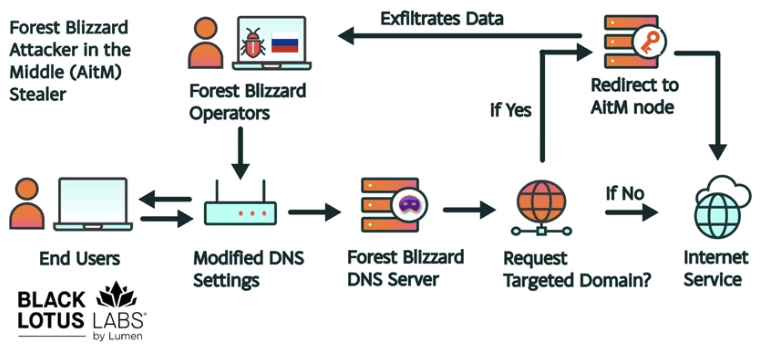
Source: krebsonsecurity.com - Resolve the Microsoft domain to a fake IP address (phishing page) that captured credentials, or
- Pass the traffic through but log the OAuth token transmitted in the clear after the user successfully logged in.
Because OAuth tokens are typically transmitted after authentication is complete, the attackers gained persistent access to the user’s Office account without needing passwords.
-
Step 6: Exfiltrate Tokens and Maintain Access
The stolen tokens were quietly forwarded from the attacker-controlled VPS to a central collection infrastructure. Microsoft reported that at the peak of the campaign in December 2025, the surveillance network ensnared more than 18,000 routers. The attackers used the tokens to access sensitive data from government and business accounts, including emails and documents. Because no malware was deployed on endpoints, traditional antivirus tools failed to detect the intrusion.
Practical Tips for Protection
- Update router firmware regularly – especially on SOHO devices. Replace end-of-life routers that no longer receive security patches.
- Change default admin credentials on all routers and disable remote management if not needed.
- Monitor DNS server settings – regularly check that your router’s DNS addresses are legitimate and haven’t been altered.
- Use encrypted DNS (DNS over HTTPS or DNS over TLS) to prevent tampering with DNS queries.
- Implement network segmentation to isolate critical systems from general office networks.
- Deploy OAuth token expiration policies and monitor for unusual token usage (e.g., from unexpected IP ranges).
- Conduct periodic vulnerability scans of internet-facing routers and apply patches promptly.
- Stay informed about threat actor tactics—follow advisories from Microsoft, NCSC, and security researchers.
Understanding the step-by-step approach used by Forest Blizzard underscores the importance of keeping network infrastructure up to date and monitoring for DNS anomalies. By securing the weakest link—the router—organizations can prevent adversaries from stealing authentication tokens and gaining unauthorized access to cloud services.
Related Articles
- How to Identify and Prosecute Ransomware Leaders: Lessons from the UNKN Case
- Cisco Acquires Astrix Security: Q&A on AI Agent Security and Governance
- Evolving Kimsuky Campaigns: New Malware Variants and Tunneling Tactics
- MetInfo CMS Zero-Day CVE-2026-29014: What Enterprises Need to Know About Active Exploitation
- 10 Key Shifts in Europe's Cyber Extortion Landscape: Germany Under Siege
- Critical Linux Security Patches Released for AEAD Socket Vulnerability Across Seven Kernel Versions
- OpenAI Debuts GPT-5.5-Cyber: A Specialized AI Model for Cybersecurity Breakthroughs
- How to Spot and Avoid Fake Call History Apps on Google Play: A Security Guide